
I remember when I first started thinking about hosting for my website, I quickly realized how important the choice would be. It felt like a huge decision—shared hosting vs WordPress hosting. Both options offer distinct advantages, but which one would be the right fit for my needs? Whether you’re just starting out with your very first website or growing your online presence for a small business, I know it can be overwhelming to figure out the best option. That’s why understanding the key differences between shared hosting vs WordPress hosting is so important. Let me walk you through these two choices, and together, we’ll figure out which one is the perfect match for your site! Ready? Let’s find out.
Insights on Shared Hosting
Shared hosting is a popular choice for many website owners, especially those who are just starting out or have smaller sites. Here’s a quick overview:
- Shared Resources: Your website shares server space with multiple other websites, using the same CPU, RAM, and bandwidth.
- Cost-Effective: It’s one of the most affordable hosting options available, making it great for budget-conscious users.
- Easy to Set Up: You don’t need much technical knowledge to get started—most hosting services offer simple, one-click installation.
- Low Maintenance: The hosting provider handles the server management, so you don’t have to worry about maintenance.
While it’s a solid choice for smaller websites, keep in mind that since you’re sharing server resources, traffic spikes from other sites could affect your site’s performance. But for many personal blogs or small businesses, it’s a reliable and hassle-free solution to get online.
What is WordPress Hosting?
WordPress hosting is a hosting solution specifically optimized for WordPress websites.
It is the most popular content management system (CMS), and it requires a certain set of technical specifications to function properly. WordPress hosting ensures that your site is tailored to run efficiently on the platform, offering benefits like faster loading times, better security, and simplified management tools.
There are different types of WordPress hosting, including shared WordPress hosting, managed WordPress hosting, and cloud-based WordPress hosting. Each type provides varying levels of support, performance, and customization. For instance, managed WordPress hosting services take care of all the technical aspects of your site, such as updates, backups, and server maintenance, which can save you a lot of time.
Shared Hosting vs WordPress Hosting: Key Differences
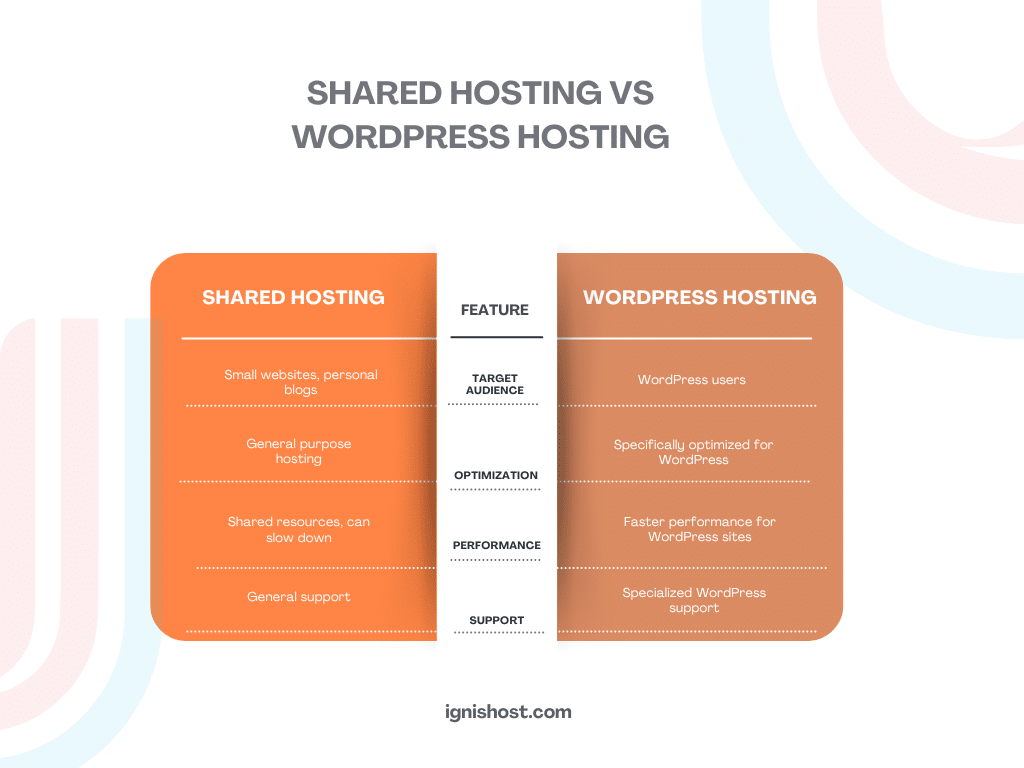
Understanding the distinctions between shared hosting vs WordPress hosting is crucial to making the right decision for your website. Here’s a breakdown of some key differences:
Optimized for WordPress
- WordPress Hosting: WordPress hosting is specifically designed to optimize the performance of WordPress sites. The servers are configured with the best settings for WordPress, including features like automatic updates and enhanced security.
- Shared Hosting: Shared hosting may not be tailored specifically for WordPress. While it’s possible to install WordPress on a shared hosting server, you won’t have the same performance enhancements or support.
Ease of Use
- WordPress Hosting: Most WordPress hosting plans come with one-click WordPress installation and easy-to-use dashboards. This is perfect for beginners who don’t have much technical expertise.
- Shared Hosting: Shared hosting is also user-friendly but may not offer as much guidance for WordPress users. It’s suitable for users who are comfortable with general web hosting but might need some technical knowledge for WordPress setup.
Performance
- WordPress Hosting: Since WordPress hosting is optimized for WordPress websites, you can expect faster load times and better site performance. For WordPress hosting, consider options like cloud hosting for even more powerful performance.
- Shared Hosting: With shared hosting, you are sharing resources with other websites. If another website experiences a traffic surge, it could slow down your website. This is an important consideration for those who expect high traffic or require high performance.
Support
- WordPress Hosting: WordPress hosting typically includes support from experts familiar with WordPress. If something goes wrong with your site, you can contact support and expect them to understand the specifics of the WordPress platform.
- Shared Hosting: Shared hosting providers generally offer standard support. While they can help with common issues, they may not offer specialized support for WordPress-related problems.
Cost
- WordPress Hosting: WordPress hosting, especially managed WordPress hosting, tends to be more expensive than shared hosting due to the specialized resources and support it offers.
- Shared Hosting: Shared hosting is usually the more affordable option, making it a great choice for budget-conscious users or those just starting out with a website.
Shared Hosting vs Managed WordPress Hosting

Credit: codeinteractive.com
When comparing shared hosting vs managed WordPress hosting, the main difference lies in the level of management and support.
- Managed WordPress Hosting is a premium hosting solution where all aspects of your website, such as security, backups, and updates, are taken care of by the hosting provider. This is perfect for people who want a hands-off experience and are willing to pay a little extra for convenience.
- On the other hand, shared hosting requires more hands-on management. You may need to update your WordPress installation manually, and server maintenance is your responsibility, depending on the provider.
Why Choose WordPress Hosting for Beginners?
If you’re a beginner, WordPress hosting offers several advantages. It’s optimized for WordPress, meaning you don’t have to worry about the technical details. You can focus on creating content and building your website while the hosting provider handles the server-side aspects.
Many WordPress hosting services also offer tutorials and support to guide you through the setup process. For example, if you’re looking for a solution that provides reliability and ease of use, check out WordPress hosting for beginners at IgnisHost.
The Benefits of Shared Hosting for Small Businesses
For small businesses, shared hosting can be a great choice, especially if you’re just starting out and need an affordable solution. You get access to basic web hosting services without the need for extensive technical knowledge. The shared hosting plan provides the flexibility to grow your site at your own pace. You can always upgrade to more robust solutions like cloud hosting when your site outgrows shared hosting.
Choosing the Right Hosting for Your Website

Credit: au.pcmag.com
When deciding between shared hosting vs WordPress hosting, consider the following factors:
- Budget: If you’re on a tight budget, shared hosting may be the most affordable option.
- Traffic: If you anticipate high traffic or need faster performance, WordPress hosting might be the better choice.
- Technical Support: If you prefer hands-off management, managed WordPress hosting offers the most support.
- Growth Potential: As your website grows, you can always switch from shared hosting to something more powerful, such as cloud hosting or managed WordPress hosting.
FAQ’s
Here’s a quick look at some of the most common FAQs.
What’s the difference between shared hosting and WordPress hosting?
Shared hosting hosts multiple sites on the same server, while WordPress hosting is optimized for better performance, security, and support for WordPress sites.
Is WordPress hosting good for beginners?
Yes, it’s perfect for beginners with easy setup, tools, and dedicated WordPress support.
What is managed WordPress hosting?
Managed WordPress hosting takes care of technical aspects like backups, updates, and security for you.
Can I use shared hosting for WordPress?
Yes, but it may not be as fast or optimized as WordPress hosting.
Is shared hosting good for small businesses?
It’s budget-friendly for small businesses with moderate traffic, though you might need to upgrade as you grow.
Final Word
In the debate of shared hosting vs WordPress hosting, the best choice depends on your specific needs. For beginners or small businesses on a budget, shared hosting may be sufficient. However, if you’re serious about WordPress and want a hassle-free experience with optimized performance, WordPress hosting is the way to go. For those looking for even more control and scalability, managed WordPress hosting or cloud hosting could be the best option.
No matter which you choose, make sure to select a hosting provider that aligns with your business goals and offers the resources you need to succeed.