


If your website is online, it’s a target.
That’s not fear-mongering. That’s reality. I’ve seen websites go down in minutes because of a distributed denial of service (DDoS) attack. Traffic spikes. Servers panic. Customers bounce. Revenue disappears. And most site owners ask the same thing after the damage is done: “How do I protect my website from DDoS attack?”
The good news?
You can protect your website from DDoS attack — if your hosting is doing the heavy lifting. Let me break it down. Clearly. Simply. And without the fluff.
What Is a DDoS Attack (And Why It’s So Dangerous)?
A DDoS attack works by overwhelming your server with massive fake traffic.
Bots flood your network traffic until real users can’t get through.
Think of it like this:
- One person blocking a door = denial of service (DoS)
- Thousands of people blocking every door at once = distributed denial of service
That’s the key difference between DDoS attack and DoS attack.
Common Types of DDoS Attacks

Credit: kaspersky.com
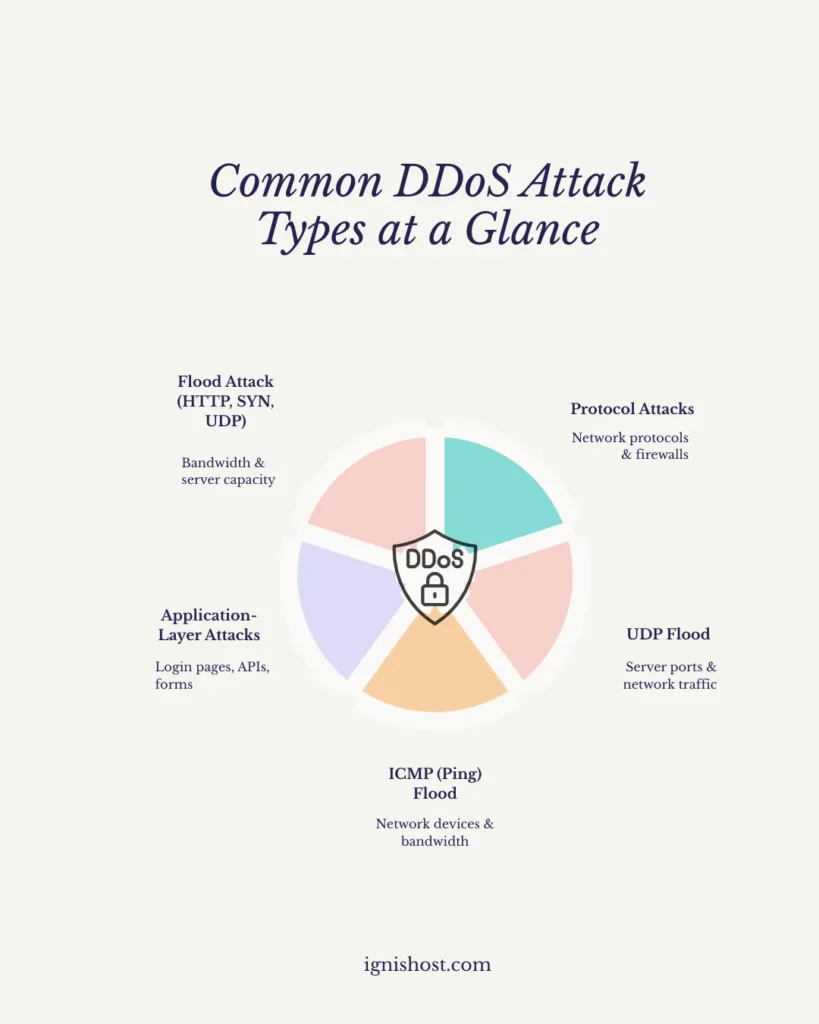
DDoS attacks come in different forms, but they all share one goal: overwhelm your server until your website becomes unavailable. Each type targets a specific weakness in your hosting environment.
-
Flood attacks
These attacks overwhelm servers with massive traffic volumes. Common examples include HTTP floods, SYN floods, and UDP floods, all designed to consume bandwidth and exhaust server capacity. -
Protocol attacks
Protocol attacks exploit weaknesses in network communication rules. By abusing TCP, ICMP, or UDP protocols, attackers drain server resources and overload firewalls and load balancers. -
Application-layer attacks
These attacks target specific website functions like login pages, search forms, or APIs. Because the requests appear legitimate, they are harder to detect and can quietly consume CPU and memory. -
UDP flood attacks
A UDP flood sends large numbers of packets to random ports, forcing the server to respond repeatedly. This quickly consumes CPU power and bandwidth, leading to downtime.
These attacks often target bandwidth, memory, and CPU at the same time, making them especially disruptive without hosting-level protection.
DDoS attacks are illegal under the Computer Fraud and Abuse Act and related fraud and abuse laws worldwide. However, automated DDoS attack tools make it easy for attackers to launch these attacks, which is why built-in DDoS protection from your hosting provider is critical.
a) How a DDoS Attack Actually Hits Your Website

Credit: sosafe-awareness.com
Here’s what happens behind the scenes:
- Attackers use a DDoS attack tool to generate fake traffic
- Thousands of compromised devices send requests
- Your server sees each request as legit
- Resources max out
- Website goes offline
Your IP address becomes the target.
Your server collapses under the load.
And no — a DDoS attack free website checker won’t save you mid-attack.
b) How Long Can a DDoS Attack Last?
This one scares people.
- Some attacks last minutes
- Others run for hours
- Large-scale attacks can go on for days or weeks
If your hosting doesn’t offer built-in DDoS protection service, you’re stuck playing defense manually — and that’s a losing game.
c) Why Hosting Is Your First Line of Defense
Let me be blunt:
You can’t block DDoS attacks alone.
Your hosting provider controls:
- Network-level filtering
- Rate limiting
- Traffic scrubbing
- Server scaling
That’s why choosing the right hosting is how you protect website from DDoS attack before it happens.
Hosting Features That Stop DDoS Attacks Cold

Credit: netlinkvoice.com
Here’s a look at the hosting features that help stop DDoS attacks before they impact your website.
A. Network-Level DDoS Protection
Good hosting detects abnormal traffic patterns instantly.
Bad traffic gets dropped.
Real users get through.
This is how you detect DDoS attack activity early.
B. Rate Limiting
Rate limiting caps how many requests an IP address can send.
It stops:
- Brute force attempts
- Flood attacks
- Malicious bots
This alone can block DDoS attacks targeting login pages and APIs.
C. Traffic Scrubbing
Scrubbing centers analyze traffic in real time.
- Clean traffic → forwarded
- Malicious traffic → dropped
This is how enterprise-grade DDoS protection works.
D. Scalable Infrastructure
Cloud environments absorb sudden traffic spikes.
That’s why cloud hosting matters.
Why Cheap Hosting Fails During a DDoS Attack?

Credit: eset.com
Budget hosting cuts corners.
No advanced filtering.
>No real-time monitoring.
>No response team.
That’s why affordable DDoS protection for websites doesn’t mean “cheap.”
It means smart infrastructure.
For balanced performance and security, explore IgnisHost Standard Hosting.
How to Check If a Website Has DDoS Protection
Ask these questions:
- Does the host offer network-layer filtering?
- Is rate limiting enabled by default?
- Do they mention denial of service DDoS protection?
- Is traffic monitored 24/7?
If the answer is vague — walk away.
How to Stop DDoS Attack on Website (The Right Way)
Let’s be clear.
❌ What not to do
- Googling “how to do a DDoS attack” (illegal)
- Testing random attack tools
- Running unapproved stress tests
✅ What to do
- Use hosting with built-in DDoS protection
- Enable firewalls
- Monitor network traffic
- Apply rate limiting
- Keep software updated
That’s how you protect website from DDoS attack without panic.
How to Fix a DDoS Attack If You’re Already Under Fire

Credit: avast.com
If it’s happening right now:
- Contact your hosting provider immediately
- Enable emergency filtering
- Block malicious IP addresses
- Scale resources temporarily
If your host can’t help — that’s the real problem.
Why IgnisHost Makes DDoS Defense Easier
I like solutions that work quietly in the background.
With the right hosting:
- Attacks get absorbed
- Servers stay online
- Visitors never notice
That’s how modern DDoS protection service should feel — invisible but powerful.
The Legal Side You Should Know

Credit: legalreader.com
DDoS attacks fall under:
- Denial of service attack laws
- Computer fraud and abuse statutes
- International cybercrime regulations
Running or hiring a service DDoS attack is illegal.
Testing must be authorized. Always.
The Bottom Line
Here’s the truth: Most people look for ways to protect website from DDoS attack after downtime hits. DDoS attacks are no longer rare, and waiting for one to happen is a costly mistake. The right hosting plays a critical role in keeping your website online by filtering malicious traffic and handling sudden spikes with ease. When DDoS protection is built into your hosting, your site stays stable, secure, and accessible—no matter what hits it.
Your website deserves that level of defense.
FAQ’s
Here’s a quick look at the most common questions people ask about DDoS attacks and website protection — answered simply and clearly.
Are DDoS attacks illegal?
Yes. They violate computer fraud and abuse laws.
How long can a DDoS attack last?
Anywhere from minutes to weeks.
Can hosting block DDoS attacks?
Yes. Good hosting can block DDoS attacks automatically.
How do I detect a DDoS attack?
Sudden traffic spikes, slow load times, and server crashes.
Is cloud hosting better for DDoS protection?
Yes. Cloud infrastructure absorbs attacks more effectively.