


When deciding between managed and unmanaged hosting, ask yourself: Do you have the technical know-how to handle things on your own, or is your budget ready for some extra help? Simply put, managed hosting means someone else takes care of it for you, while unmanaged hosting puts you in control. Want to learn more? Let’s dive into the details of managed vs unmanaged hosting.
What is Managed Hosting?

Credit: webmastersdesktop.com
You cannot simply make a decision as long as you don’t know what managed hosting refers to. It is like having an expert handle all the technical work for you. With managed hosting, the hosting provider takes care of all the server management, including maintenance, security, updates, and troubleshooting. You don’t have to worry about a thing. This is perfect for people who don’t have the technical knowledge or time to manage the server themselves.
In managed hosting, the provider also ensures that your website stays up and running smoothly, with optimal performance. This is great for businesses or individuals who want to focus on their core tasks rather than managing their server environment. Providers usually host your site in reliable data centers with excellent security features, so you get peace of mind.
Types of Managed Hosting
Managed hosting isn’t just one thing – it actually comes in a variety of types, each with its own set of features. Let’s dive into the different options below!
Fully Managed Hosting
This is the top-tier option where the provider handles everything. From setting up the server, performing updates, and patching security issues, to taking regular backups and providing 24/7 expert support. You don’t have to worry about any technical aspect; everything is managed for you.
Semi-Managed Hosting
In semi-managed hosting, the hosting provider takes care of the server setup, security, backups, and maintenance. However, you may need to handle some of the software updates or troubleshooting on your own. This option offers a balance of convenience and control, suitable for users with some technical skills but who don’t want to manage everything.
Managed WordPress Hosting
This type of hosting is designed specifically for WordPress sites. It includes automatic updates for WordPress, daily backups, enhanced security, and speed optimizations. Managed WordPress hosting providers focus on delivering a streamlined experience for WordPress site owners.
Managed Cloud Hosting
This is a more modern take on managed hosting. In managed cloud hosting, the hosting provider manages your cloud infrastructure, which gives you the scalability and flexibility of the cloud with the added benefit of expert support and management. This type is often used by businesses needing scalability without the technical burden.
Pros of Managed Hosting
- Expert Support: The hosting provider’s experts are available 24/7 to help with any issues, ensuring minimal downtime.
- No Technical Skills Needed: You don’t need to have any technical knowledge to maintain your server.
- Better Security: Managed hosting providers handle all security updates and monitoring, reducing the risk of security breaches.
- Reliability and Uptime: With all the technical aspects taken care of, you’re likely to experience fewer technical issues and better uptime, thanks to performance optimization from your hosting provider.
Cons of Managed Hosting
- Higher Cost: Since you’re paying for the convenience of fully managed services, managed hosting tends to cost more.
- Less Customization: Here, since the provider handles everything, you may have less control over your server settings and customizations. You may be limited in adjusting your control panel settings.
What is Unmanaged Hosting?

Credit: tomsguide.com
And next, we have unmanaged hosting. It is the opposite of managed hosting. With unmanaged hosting, you’re in full control. The hosting provider gives you a server, but you are responsible for setting it up, configuring it, maintaining it, and securing it. This option is ideal for those with technical knowledge or a dedicated IT team who want complete control over their server environment.
Unmanaged hosting gives you the flexibility to customize everything, but with that flexibility comes more responsibility. If something goes wrong, you’ll need to fix it yourself. Unmanaged dedicated server hosting and unmanaged cloud hosting are popular options for businesses with the required expertise.
Types of Unmanaged Hosting
Several different types fall under unmanaged hosting. Let’s discuss each one of them.
VPS Hosting (Virtual Private Server)
It is a virtualized server where you share a physical server with other users, but you have a dedicated slice of the resources (CPU, RAM, storage). It gives you more control than shared hosting but at a lower cost than a dedicated server.
This is perfect for people who need more power and flexibility than shared hosting offers but don’t need a full dedicated server hosting.
Dedicated Hosting
With unmanaged dedicated server hosting, you get an entire physical server to yourself. This gives you complete control over the server, including the ability to customize it to meet your needs.
Unmanaged dedicated servers are perfect for large websites or applications that need lots of resources and can’t share their server with anyone else.
Shared Hosting
As the name implies, shared hosting is where multiple users share the same server. It’s the most affordable option but offers the least control. You share resources like CPU, RAM, and storage with other users, and you’re responsible for your website only, not the server.
This type is not exactly unmanaged in the sense that the provider still manages the physical server, but you have control over your own site’s environment.
Cloud VPS Hosting
Unmanaged cloud hosting combines the flexibility of VPS hosting with the scalability of the cloud. You’re given a virtual server in the cloud, which can grow or shrink depending on your needs.
This is great for businesses that experience fluctuating traffic or need a high-performance cloud solution but want to avoid the hardware limitations of traditional hosting.
Pros of Unmanaged Hosting
- Full Control: You have complete control over the server, allowing you to configure it however you see fit.
- Lower Cost: Since you’re doing most of the management yourself, unmanaged hosting tends to be cheaper than managed hosting.
- Flexibility: You can install custom software, configure the server to your specifications, and have full access to the server’s resources.
Cons of Unmanaged Hosting
- Time-Consuming: Managing a server can be very time-consuming. You need to perform regular updates, security patches, and backups yourself.
- Technical Skills Required: You need to have a good understanding of server management, operating systems, and security. Without these technical skills, managing an unmanaged server can be challenging.
- Risk of Downtime: Since you’re in charge of server maintenance, if something goes wrong, your website may experience downtime until you resolve the issue.
Which One Should You Choose?
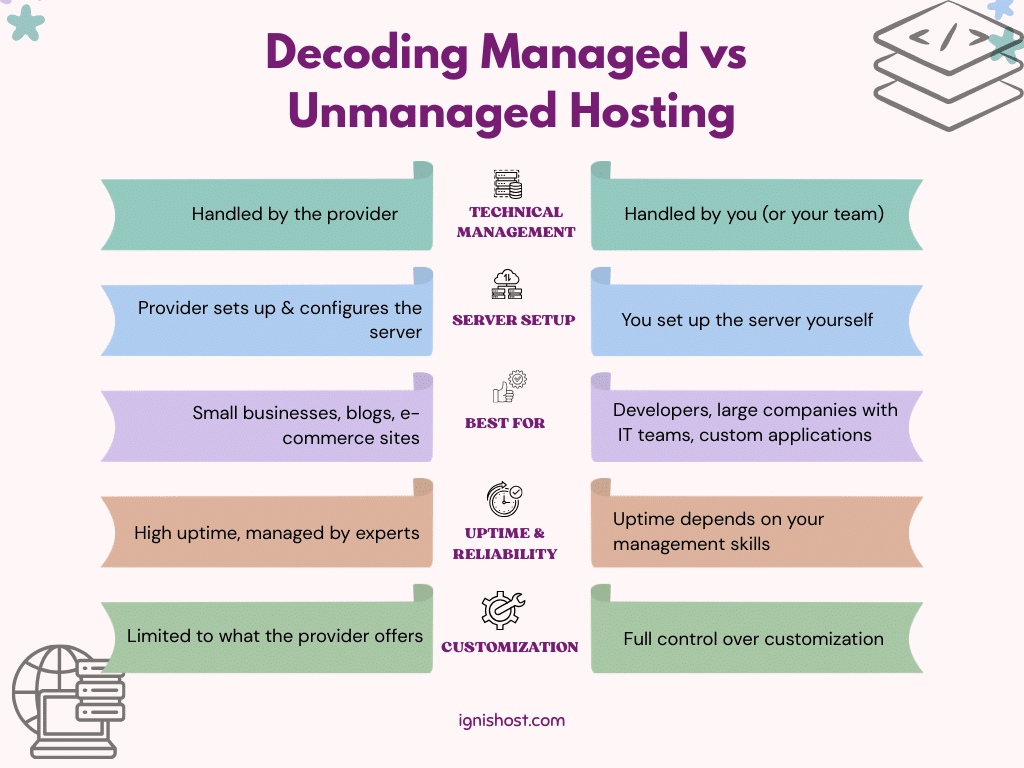
It’s very simple. Choosing between managed and unmanaged hosting depends on your technical knowledge, the level of control you want, and your budget.
Go for Managed Hosting if:
- You want a hassle-free experience with minimal server management.
- Or you don’t have the technical skills to handle server administration.
- You need consistent uptime and expert support.
- Your business relies on a reliable and secure server environment.
Go for Unmanaged Hosting if:
- You have the technical expertise to manage your own server.
- Simply, you want complete control over your server and hosting environment.
- You need a cost-effective option and are comfortable handling the technical aspects.
- Or, you have specific customization needs that managed hosting can’t provide.
Users of Managed Hosting
- Small to Medium Businesses: Managed hosting is perfect for businesses that don’t have an in-house IT team but need reliable, high-performance hosting.
- Bloggers and Content Creators: If you want to focus on creating content without worrying about server management, managed WordPress hosting is ideal.
- E-Commerce Sites: With sensitive customer data and a need for constant uptime, managed cloud hosting ensures the best security and performance.
Users of Unmanaged Hosting
- Developers and Tech-Savvy Users: Unmanaged VPS hosting is perfect for developers who want to have full control over their environment and configurations.
- Larger Companies with IT Teams: If you have a technical team, unmanaged hosting provides the control panel and flexibility you need.
- Custom Applications: If you’re running custom software that requires specific configurations, unmanaged hosting allows you to tailor the server to your needs.
Final Remarks
At the end of the day, the decision between managed vs unmanaged hosting boils down to your needs. If you want convenience and expert support without having to worry about server management, managed hosting is your best bet. On the other hand, if you have the technical knowledge and need full control, unmanaged hosting might be the perfect fit.
Both options have their own strengths and weaknesses. Once you weigh everything, you’ll be able to choose the option that works best for you!
Frequently Asked Questions
Now, to wrap up our discussion, here’s what you might be looking for.
What is the main difference between managed and unmanaged hosting?
Managed hosting handles all the technical aspects for you, while unmanaged hosting gives you full control but requires you to manage everything.
Which hosting is better for a business website?
Managed hosting is often the better choice for businesses that don’t have technical teams and need reliable, hands-off hosting.
Can I upgrade from unmanaged to managed hosting?
Yes, most hosting providers allow you to upgrade from unmanaged to managed hosting whenever you’re ready.
Is unmanaged hosting cheaper than managed hosting?
Yes, unmanaged hosting is typically more affordable since you’re handling the server maintenance yourself.
Do I need technical skills for managed hosting?
No, managed hosting is designed for users who don’t have technical expertise. The provider takes care of everything for you.